Tools
Information about the tools necessary for Level Modding.
Getting Started
Entities Files
Levels are edited through ".entities" files and are saved in:<resource>/maps/game/<campaign>/<level_name>/<level_name>.entities
Example:e1m1_intro_patch1/maps/game/sp/e1m1_intro/e1m1_intro.entities
> This is the level file path for Hell on Earth.
Remember to check for the highest resource load priority for the level
M347h00k:
M347h00k (aka Meathook or MH) originally by Chrispy - Download
> M347h00k unlocks developer commands and allows you to edit your level in-game.
> Although not mandatory, this would make level modding significantly easier.
To install: Download XINPUT1_3.dll and place it into the DOOM Eternal installation directory (like how you installed the Mod Injector).
Tools for Editing Levels:
Text Editor - Notepad++ Recommended
EntitySlayer by FlavorfulGecko5 - Download
> EntitySlayer is an easy yet powerful entity editing tool that lists entities as nodes, while providing advanced features such as filtering, searching, multi-node selection.
> To install: Download the Entity Slayer zip and extract its contents to whatever folder you want. Make sure to copy oocore_8_win64.dll from DOOM Eternal's installation directory to the folder.
Text Editor
Notepad++ is the Recommended Text Editor to Use
.entities files are compressed and must be decompressed in order to edit Entities.
Decompressing Tools:
EntitySlayer by FlavorfulGecko5 - Download
File -> Export to text (make sure the file extension is still .entities)
SAMUEL Asset Extraction Tool by SamPT - Download
Currently exports textures, .decls, and .entities files.
idFileDeCompressor by PowerBall253 - Download
Even though the .entities file is decompressed, make sure it still retains the .entities file extension.
When editing a decompressed .entities file while you are in game, you will need to create a folder called "overrides" in the DOOM Eternal installation directory. Structure it like this:overrides/maps/game/<campaign>/<level_name>/<level_name>.entities
Example:overrides/maps/game/sp/e1m1_intro/e1m1_intro.entities
> This is the level file path for Hell on Earth.
You can place as many level files you like in the overrides folder
With M347h00k installed, you can enter your level and edit the decompressed entities file while you are in-game.
Typing in the console command, mh_force_reload will reload the level with the recent changes you made in the text file.
EntitySlayer
EntitySlayer by FlavorfulGecko5 - Download
EntitySlayer is an easy yet powerful entity editing tool that lists entities as nodes, while providing advanced features such as filtering, searching, multi-node selection.
To install: Extract the files to whatever folder you want. Make sure to copyoocore_8_win64.dllfrom DOOM Eternal's installation directory to the folder.
EntitySlayer does not require you to decompress .entities files.
You can open the compressed files within the application, but you should be in your chosen level and use
File -> Open from MH to open the Meathook instance. Be sure so save your instance somewhere.
With EntitySlayer, you can press the button, "Reload level" and it will perform the command "mh_force_reload" for you.
If you wish, you can copy an entity into a dedicated text editor like Notepad++, make changes there, then copy the result back to EntitySlayer.
Copying from EntitySlayer to Text Editor:
1. Copy the eventCall selected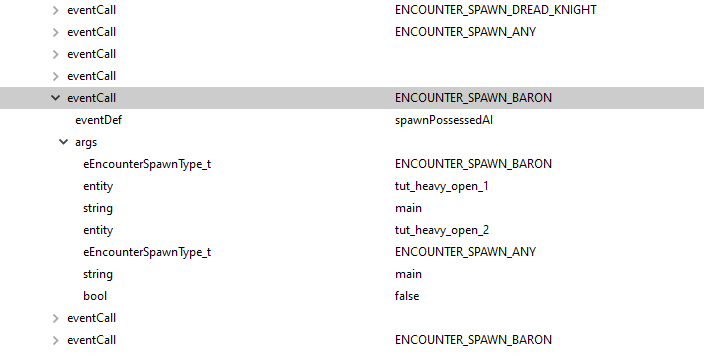
2. Paste into text editor
3. Make your changes and only copy the following
4. Reinsert the eventCall into EntitySlayer
5. If you are replacing an eventCall, delete the original one, but you can always add more eventCalls this way.