Getting Starting
This chapter contains all the necessary information for playing and optimizing multiplayer mods.
How to Play Multiplayer Mods
See Commands (CMD) before proceeding.
How to Play
- How to Install Mods (general guide): https://wiki.eternalmods.com/books/1-how-to-install-mods/page/how-to-install-mods-doom-eternal
- Get the latest version of the Eternal Mod Injector.
Windows (Steam): https://gamebanana.com/tools/download/7475
Linux (Steam): https://github.com/leveste/EternalBasher/releases - All players should have the same multiplayer-related mods installed (most addons are client-sided and not every player needs to have them installed). If a player has different or extra mods installed, their game may de-sync and crash. Texture, Model, String, & Audio mods should be unaffected. Everything in the "Overrides" folder must be removed if it exists.
- A player (the host) should create a private lobby and invite a friend or two (the clients). The host invite players by selecting the Social Menu ( P ) and finding their friend or favorite profiles.
Some multiplayer mods only require 2 players, the mod author should specify this. - Once all players are ready, the host should select a map in the lobby menu to instantly load all players into the map. Alternatively, players may ready-up with mods that require 3 players such BATTLEMODE & INVASION.
- The host may execute a console command to load into a map for testing purposes. Here is an example of a command to load into a multiplayer map:
loadDevMenuOption devmenuoption/pvp 7 1
This command will load the Torment map from BATTLEMODE.
You can learn more about loading into BATTLEMODE maps here: https://wiki.eternalmods.com/books/3-developer-console/page/load-battlemode-maps
Multiplayer modding guides: https://wiki.eternalmods.com/books/9-multiplayer-modding
Network Issues
Game Issues
- Players cannot access dossier to see the mini-map or change their runes.
- Take Back rune & Extra Lives do not work.
- Time-affecting runes and weapons will de-sync clients.
- Barrels may not explode properly. This is due to making them Network Replicated and treating them as a loot drop, which prevents idProp2 entities from crashing the game for clients.
Host Issues
- Non-network replicated actions triggered by the host will not active for clients.
- Player Outlines and Nametags are invisible to the host. Outlines can be visible if they are static (do not disappear/reappear when breaking line of sight).
- Secondary Fire weapon projectile & hitscan attacks are invisible & inaudible to clients. Damage SFX can be added to damage decls for PvP modes so clients can hear the weapon if they are hit by one.
Client Issues
- Chaingun Energy Shield weapon mod crashes the game.
- Ice Bomb equipment lags the game.
- Health/Armor for Blood crystal upgrades do not work.
- Certain Runes do not work consistently. Notably, time-affecting runes.
- Punchables and Shootables offer no visual feedback.
- Entity Offsets will shift AI closer to the world origin (0, 0, 0) by 0.6%.
- Chainsaw fuel pickups cannot be picked-up after a client has already picked-up 2 of them in the same map. Fuel pickups can be modified into give ammo triggers to oust this issue.
- Armored Barons crash the game when they strike a player with their mace attack & their armor does not appear.
- Blood Maykrs will not disable their shield when vulnerable even though they can be damaged and killed during the window.
- Cursed Prowlers can be killed and locked-onto when a client is cursed. The curse effect can be changed so the host and clients may undergo a similar experience.
- Tyrants will crash the game when they walk. The walking behavior can be disabled to oust this issue.
- Cueballs will not launch themselves when killed and may not explode. They can immediately explode in place so the host and clients will see the same effect.
- Spirits can only be targeted and killed by the host.
- Tentacles cannot be chainsawed.
Network Replication
About
- Most entities have either networkReplicated = false; or networkReplicated = true; near the top of the entity outside the edit field. They determine how entities are broadcasted to clients, but they often create many visual issues or crashes when set to true.
- For example: a network replicated door obstacle will have a positioning offset that is located at a slightly incorrect location for clients. The effect is greater the farther away the entity is from 0, 0, 0 or the world origin. This applies to every network replicated entity but the effects are gradually more noticeable from further distances.
- Network replicated entities located beyond the coordinates of x = 800, y = 800, z = 200 will be unplayable for clients.
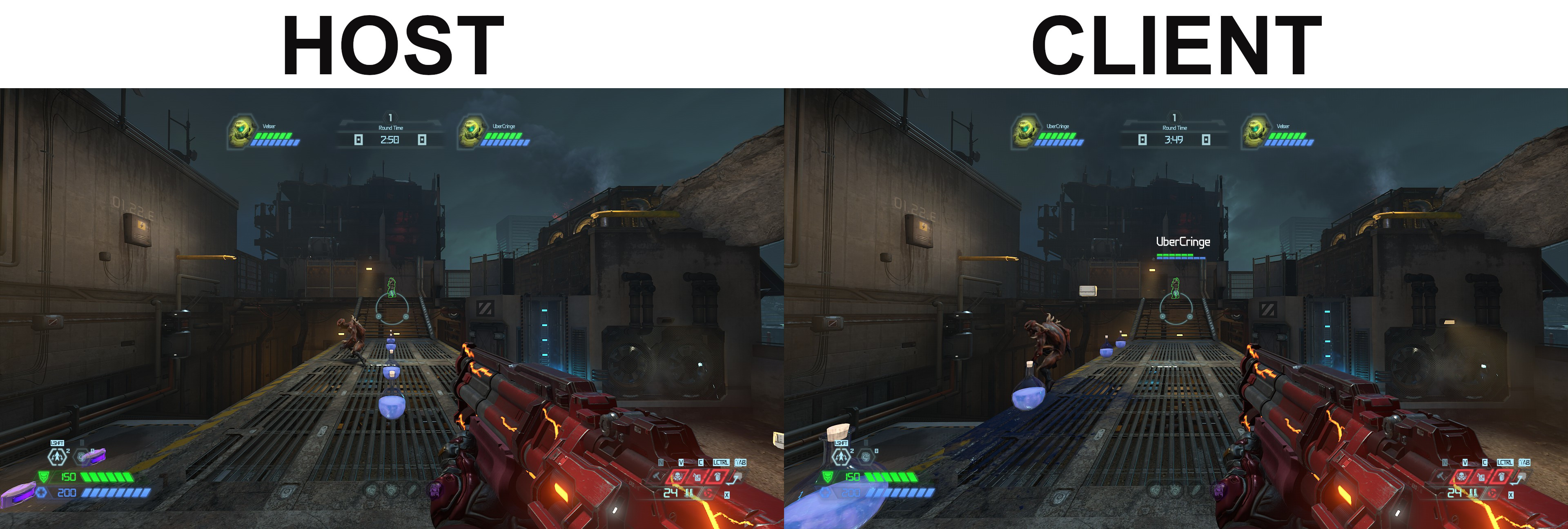
Entity offsets are roughly 0.6% closer to the coordinates of 0, 0, 0 for clients. The host does not experience this issue.
There are ways to work around entity offsets (see Entities). As of the current versions of modded multiplayer, only the AI suffer from entity offsets.
Maps with Non-Noticeable Offsets (xy < 300, z < 100)
- All 9 BATTLEMODE maps
- Fortress of Doom
- Cultist Base
- Doom Hunter Base
Intro Tram & Boss Stage2 arenas have tolerable offsets - Super Gore Nest
- Arc Complex
- Taras Nabad
Flooded & Crucible arenas have tolerable offsets - The Blood Swamps
Left-side arenas have tolerable offsets - The Dark Lord
Stage1 & Stage3 arenas have unplayable offsets
Maps with Tolerable Offsets (xy < 800, z < 200)
- Hell on Earth
Barge & Citadel areas have unplayable offsets - Sentinel Prime
- Nekravol I
- Urdak
Yellow Control Tower has borderline unplayable offsets - Final Sin
- The Holt
Possessed Tyrant arena & onward have unplayable offsets - Reclaimed Earth
Entire map has borderline unplayable offsets
Maps with Unplayable Offsets (xy > 800, z > 200)
- Exultia
Sentinel section has tolerable offsets - Mars Core
- Nekravol II
- UAC Atlantica Facility
Intro arena to Red Key arena have tolerable offsets - The World Spear
Intro Village section has tolerable offsets - Immora
- All Slayer Gate arenas
Useful Commands
Optimization
restartMapWithLobby
Can be executed by the host to restart the entire map for all players in the party.exitShellLobby
Can be execute by the host to leave the match and retain all players within their party, so long as the clients do not select ACCEPT in the warning menu.disconnect
Can be executed by clients to leave the match and stay in the party, so long as the clients do not select ACCEPT in the warning menu.g_havokHeapLimitMB 200
Can be executed by any player to increase the havok limit (how much geo can do things simultaneously) which may prevent some crashes.net_maxRate 100
Can be executed by any player to increase the network rate which may decrease latency.
Development
pvp_skipReadyUp 1
Can be executed by the host to bypass the "waiting for players" event on map start. Leaving this enabled with other players may create issues for clients.pvp_skipReadyUp 0
Can be executed by the host to enable the "waiting for players" event.ai_faction_overrideEmotion_ai 0
Can be executed by the host to stop all AI from attacking much like the "notarget" command.ai_faction_overrideEmotion_ai -1
Can be executed by the host to enable normal AI aggression towards players and other AI.warning_disable allCan be executed by any player to disable the barrage of warnings in the console.warning_enable all
Can be executed by any player to enable all warnings. Restarting the game will also enable all warnings.
Auto-Executing Commands on Game Launch
- You can input commands as a new line into the candidate.cfg file within the DOOMEternal\base folder to auto-execute them when the game launches. Below is an example of DOOMEternal's installation file path for Windows.
C:\Program Files (x86)\Steam\steamapps\common\DOOMEternal\base\candidate.cfg - The candidate.cfg file can execute other config files with the
exec NameOfFile.cfgcommand added as a new line.