
Section 1: Required tools
Now that we know that the file we actually edit to create a level mod is the .entities file, we will need a way to edit it.
And not just edit it, but find a way to edit it on the fly so we don't need to re-compress and re-inject the file after each and every change.
It is important to note a few, crucial details, each of which will have a corresponding tool or helpful asset to help with that.
1. As you have seen in the last page, the .resources files aren't exactly openable. We will need to extract the .entities file from them to edit it.
2. This file is actually just text and can be opened with any text editor. Unlike id Software who uses their own software called idStudio to edit levels in a 3D environment, we are left with 2d text. An .entities file purely consists of defined entities, or entitydefs. Entitydefs can be quite literally anything from triggers to encounter managers to pickups.
Example 1: An entity that is defined to be a spawn point for a marauder.
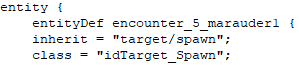
Example 2: An entity that is defined to be shotgun ammo.

3. If you ever tried to open the .entities file within an existing level mod, you may notice that it's made up of nonsense weird characters. This is because the file is compressed. Decompressed files are the plainly text versions you see, but are too large to replace an existing .entities file, which is why they are compressed before being put into a level mod.
4. If you were to open the .resources files of a map, including its _patch versions, you may notice multiple ones have their own .entities file. What gives?!