
Section 1: Required tools
Now that we know that the file we actually edit to create a level mod is the .entities file, we will need a way to edit it.
And not just edit it, but find a way to edit it on the fly so we don't need to re-compress and re-inject the file after each and every change.
It is important to note a few, crucial details, each of which will have a corresponding tool or helpful asset to help with that.
1. As you have seen in the last page, the .resources files aren't exactly openable. We will need to extract the .entities file from them to edit it.
2. If you were to open the .resources files of a map, including its _patch versions, you may notice multiple ones have their own .entities file. What gives?!
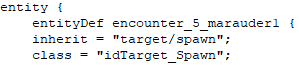
3. This .entities file is actually just text and can be opened with any text editor. Unlike id Software who uses their own software called idStudio to edit levels in a 3D environment, we are left with 2d text. An .entities file purely consists of defined entities, or entitydefs. Entitydefs can be quite literally anything from triggers to encounter managers to pickups.
Example 1: An entity that is defined to be a spawn point for a marauder.
Example 2: An entity that is defined to be shotgun ammo.

4. If you ever tried to open the .entities file within an existing level mod, you may notice that it's made up of nonsense weird characters. This is because the file is compressed. Decompressed files are the plainly text versions you see, but are too large to replace an existing .entities file, which is why they are compressed before being put into a level mod.
5. The formatting of these .entities make no sense! How am I supposed to determine the spawnposition of something let along its spawnorientation?
If these details made no sense to you, don't worry. I will provide each tool and let you know how they work in setting up your foundation to edit a level with.
They are:
1. SAMUEL to extract the .entities file from the .resources files.
2. A list of a map's current highest priority so you know which .resources file to extract from and subsequently edit. The game uses the .entities file from the map's highest priority patch. If you choose the wrong one, the mod will not work.
3. Notepad++ to edit the .entities file with. You may also use EntityHero, a program that is specifically designed to work with these files, but this guide will not use it as I have no experience with it.
4. idFileDecompressor. You will not need to use this tool to decompress .entities files as SAMUEL neatly gives them to you already readable and editable, but you will need it to re-compress them in order to let level mods use it without giving you a memory error.
5. meathook.dll. This tool is so useful for level modding that without it, I would say at least 60%90% to 99% of all level mods would not exist today because they would've taken too long to make. Ludicrously long. Meathook allows for on the fly editing and without it level modders would've been stuck re-compressing and re-injecting their edited .entities file over and over, not to mention its handy coordinate grabbing commands which allows for spawn points to not be manually typed out every time. The latest version, v7.1, is confirmed to cause crashes, I recommend using v6.69.
TODO: Add download links to each.