
EntitySlayer
EntityHeroEntitySlayer by Scorp0rX0rFlavorfulGecko5 - Download
EntityHeroEntitySlayer isaan easy yet powerful entity editing tooltothathelp newer modders into level modding. It helps with organizinglists entitiesandasmakesnodes,itwhileeasierprovidingtoadvancedmovefeaturesaroundsucheventCalls.as filtering, searching, multi-node selection.
To install: Extract the files to whatever folder you want. Make sure to copyoocore_8_win64.dllfrom DOOM Eternal's installation directory to the folder.
EntityHeroEntitySlayer does not require you to decompress .entities files.
You can open the compressed files within the application, but you should be in your chosen level and use
File -> Open from MH to open the M347h00kMeathook instance. Be sure so save your instance somewhere.
With EntityHero,EntitySlayer, you can press the button, "Reload level" and it will perform the command "mh_force_reload" for you.
ToIf avoidyou issues,wish, doyou mostcan ofcopy thean typingentity ininto a dedicated text editor (suchlike as Notepad++). Copy an entity or eventCall and paste them into the text editor,, make yourchanges changes,there, then copy thatthe and paste itresult back intoto where it was.EntitySlayer.When pasting eventCalls, ignore the "item[#] = {" bracket because it would sometimes throw an error.
Copying from EntityHeroEntitySlayer to Text Editor:
1. Copy the eventCall selected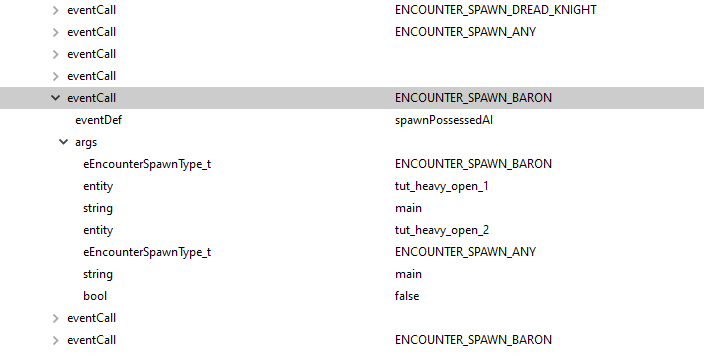
2. Paste into text editor
3. Make your changes and only copy the following
4. Reinsert the eventCall into EntityHeroEntitySlayer
5. If you are replacing an eventCall, delete the original one, but you can always add more eventCalls this way.
Issues with EntityHero:
EntityHero can be a bit weird and is prone to crashes. Be sure to frequently save to avoid loosing progress.
When editing text directly in EntityHero and leaving a field blank (such as a string), the field might auto-generate a garbled mess that will result in the game crashing when reloading the level.Copy the corrupted entity to a text editor and replace the garbled text with two quotations to fix this.When double clicking the parent field of an entity in EntityHero, the text, "entity" would be the only thing showing up. Doing this action also sometimes generates a garbled mess in that field.Copy the corrupted entity to a text editor and replace the garbled text withentityto fix this.Sometimes, entities will randomly duplicate its quotations, particularly when relating to Invasion stuff.This results in crashes when reloading the level, and this issue is common for Base Campaign levels.A solution is to decompress the entities file to plain text, find where all the duplicate quotations are (use Find and Replace), then re-compress the entities file.
Newer versions of EntityHero tend to mitigate these issues so you may not experience any of these.